
Managing bulk discounts manually for hundreds of products is a daunting task. If you are using the Tiered Pricing Table for WooCommerce plugin, you can significantly speed up your workflow by using the native WooCommerce CSV importer.
Step 1: Prepare Your Meta Keys
The importer is smartest when your CSV column headers match the plugin’s internal keys. If you name your columns as follows, WooCommerce will attempt to automatically map them for you:
| Recommended Header | Purpose | Example Value |
tiered_price_type | Sets the discount method (fixed or percentage). | fixed |
tiered_price_fixed | The quantity/price rules for fixed pricing. | 10:90,20:80 |
tiered_price_percentage | The quantity/discount rules for percentages. | 5:10,10:20 |
tiered_price_minimum | Sets the minimum order quantity. | 10 |
Rules Formatting
For the “Rules” columns, use the syntax Quantity:Value.
- Fixed Example:
10:15(10+ units cost $15 each). - Percentage Example:
10:20(10+ units get a 20% discount). - Multiple Tiers: Separate tiers with a comma (e.g.,
10:90, 20:80, 50:70).
Step 2: The Import Process
Upload: Go to Products > All Products and click Import. Choose your CSV file and select “Update existing products” if you are modifying items already in your shop.
Map the Fields: On the “Map CSV fields to products” screen, look for your tiered pricing columns. If they didn’t auto-map, open the dropdown and select the corresponding native field:
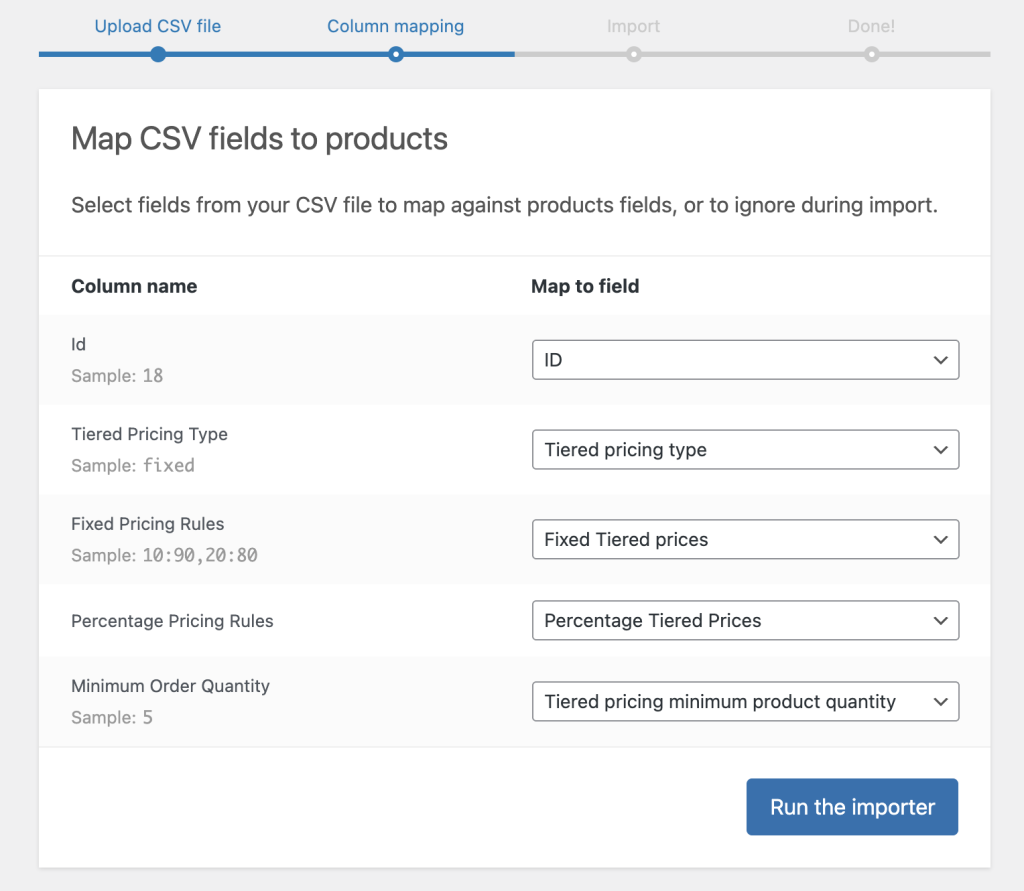
Run: Click Run the Importer.
Troubleshooting Variable Products
Tiered pricing rules are applied to individual products. If you are importing rules for Variable Products, ensure your CSV rows target the Variation SKU or ID. This ensures each specific variation (like “Large” or “Red”) receives its own unique pricing table.
Official Documentation & Resources
For more in-depth information on managing CSV files and the import/export engine, refer to the official WooCommerce Product CSV Importer Documentation: This is the primary guide for using the built-in tool, including schema requirements and general guidelines for UTF-8 formatting.